



 Ready Enough
Unlock Your Access
First visit only
{{ unlockErr }}
Your code is in your welcome email.
Trouble getting in? hello@jilliancarpenter.com
Ready Enough
One quick thing before you start
Right now, you’re in a third-party browser (likely connected to Outlook or Gmail). To get the most out of the Ready Enough web app, copy the link below, close this window, and open Safari, Chrome, or your typical browser. Paste and go ☺
You’re ready{{ closingName }}.
You know what matters to you, you know your options, and your plan is ready to go. You are wildly capable.

— Jillian
Before you start
Everything you write stays on your device — nothing goes to a server. That’s good for privacy, and it means {{ a2hsHabitsIntro }}:
You’re in{{ beatName }}. Let’s get started!
{{ chapVidLabel }}
Welcome Guide
How this app works, when to do it, and what you'll walk away with.
What this is
This app guides you through the process of building a birth plan. By the end of it you will ground into your values, understand your options, put it all in your own words, and bring your team along with you. As you go, you'll become someone who can make decisions from a centered place, think on your feet when things change, and collaborate with your provider as a partner rather than a bystander. The plan you'll get at the end is a receipt for all the preparation you've done, and it will act as a tool for communication and consent on your birthing day.
The six steps
Getting Started — Lock in the basics.
Establish Your Values — ground into the values that shape who you are & the decisions you make.
Name Your Context — The lived experience you bring with you into the birth room.
Grasp Your Options — Over 100 clinical and experiential options, made digestible & actionable
Assemble Your Plan — This is the magic step where everything comes together
Gather Your Team — Collaboration is the name of the game, people!
Exercise Your Agency — You’ve got this.
The mini course
As you move through this journey, you’ll find short introductory videos at the beginning of each step to provide key information, instructions, and the framing I give my private doula clients during our 1:1 birth planning sessions. While you absolutely can zip through without watching them, you’re going to get out of this process what you put in. For the greatest benefit, give yourself time to absorb the content. I made them short and sweet because I know your time is precious!
How to pace yourself
You can go one step at a time or get focused and get it done in a couple of hours. My suggestion: do whatever you need to, and just get it done. Once you're through, a birth plan won't be looming over your head, and you'll feel lighter, more prepared, and excited to meet your baby.
What you'll walk away with
A one-page birth plan your team will actually read, with pivot plans for the what-ifs. An individualized question list for your provider, built from your preferences. A partner or support team who knows exactly what to protect. And the quiet confidence of knowing why every line is on the page.
What this isn't
This isn't a childbirth education class (please take one — I'd love that for you), and it isn't medical advice. Please take what comes up here to your medical provider to fully integrate the context of your medical history and the environment you'll be birthing in.
A note on the AI inside
These tools are incredible thinking partners — they'll give you structure, spark ideas, and help you move from blank page to organization queen in less time than a late night doom scroll session. But the real magic is YOU.
Make sure to review the outputs they give.
AI tools are here to help, but they're not perfect. Always review and edit your results before using them — you're the final filter for accuracy, originality, and fit. Service and access depend on third-party providers, and usage may be monitored to keep the system fair for everyone. By using these tools, you agree to our Terms and Privacy Policy.
One more time for the people in the back
Here’s the deal: I don’t have the tech chops to guarantee that I can keep your personal health information private. I’m a one-woman show over here, and my expertise is in fetal positioning + self-advocacy, not so much data security... To keep your information safe, it all stays stored on your device. When you use the AI tool to generate your formatted plan, your answers are temporarily sent to Anthropic for that specific purpose. Your data is not used for training, not stored with your name, and never kept. So, to facilitate that, you’re going to save an icon to this web app on your home screen or desktop, so that you can easily access your answers with no logins or hunting for the email necessary.
Note: While your answers do save automatically when using the same device and browser, you will not be able to open your answers in any other location. If you’d like to transfer your answers, back them up on one device and restore them on the other.
Important: clearing your cache will delete your saved answers, and some browsers (particularly within iOS) are set to do this periodically. Backing up is highly recommended at the end of each work session to make sure you do not lose your answers. If this happens, I am not able to retrieve them for you, and you’ll need to start fresh.
Found a bug? Have feedback?
If something's broken or behaving strangely—or you want to let me know which pieces of the process are most helpful—email me at hello@jilliancarpenter.com
You’ve got this!
(and I’ve got you)
FAQ & Help
Quick answers. If something's not covered here, email me.
Jump to a topic
Nothing matches that — try another word, or email me.
{{ sec.label }}
Found a bug?
Something broken or confusing? Tell me — feedback is a gift. The button below starts an email with the details I need already filled in.
Report a bug →Ready Enough
{{ welcomeLine }}
I’m so glad you’re here.
Or scroll down to explore first.
Ready Enough
{{ welcomeBackLine }}

Note: While your answers do save automatically when using the same device and browser, you will not be able to open your answers in any other location. If you’d like to transfer your answers, back them up on one device and restore them on the other.
Important: clearing your cache will delete your saved answers, and some browsers (particularly within iOS) are set to do this periodically. Backing up is highly recommended at the end of each work session to make sure you do not lose your answers. If this happens, I am not able to retrieve them for you, and you’ll need to start fresh.
{{ backupMsg }}
{{ wsTitle }}
{{ wsHint }}
Selected: {{ valuesCount }} values
{{ fld.label }}
Bring the right questions to the appointment
This reads your plan and builds the specific questions only your provider and hospital can answer — with a spot to record each answer during the conversation.
{{ askWorkingMsg }}
{{ askError }}
These come from your plan. They're about how I see hospitals work most of the time, and nothing should be considered individualized medical advice. The goal is to ask better questions and get better answers!
{{ narrowTitle }}
{{ narrowHint }}
Currently keeping {{ narrowCount }} of {{ narrowPool }}. {{ narrowRoom }}
Not keeping — tap to add back
Now it's time to put your own spin on things! I want to know what these values mean for you. The generic definitions are included as inspiration, and you can keep them, tweak them, or throw them out completely. The clearer you are, the more actionable your values will be for your support team.
 Value {{ row.n }}
{{ row.name }}
Value {{ row.n }}
{{ row.name }}
{{ row.def }}
All five defined ✓
Your values are set. Next: your context.
{{ sp.name }}
Pain Medication Preference
Mark where you currently fall:
Birth Option Organizer
{{ backupMsg }}
{{ booResultLine }}
Description{{ r.desc }}
Why parents might choose this{{ r.benefits }}
Why they might not{{ r.risks }}
Experiential Tradeoffs{{ r.tradeoffs }}
Insider Context{{ r.other }}
{{ booTagLine }}
Looking for something specific?
Every option, considered ✓
{{ booReceiptLine }}
Please don’t risk it…
{{ booCounter }}
The bookmark in the corner marks a “Big Rock”, which is a preference that matters most to you. Big Rocks get top billing on your customized birth plan.
{{ booGroupNote }}
{{ e.listHeader }}
{{ e.title }}
{{ isec.body }}
{{ booSwipeHint }}
{{ booSecCompleteLine }}
{{ pg.label }}
· {{ pi.title }} {{ pi.sec }} {{ pi.star }}
Nothing tagged here yet.
Birth Plan Builder
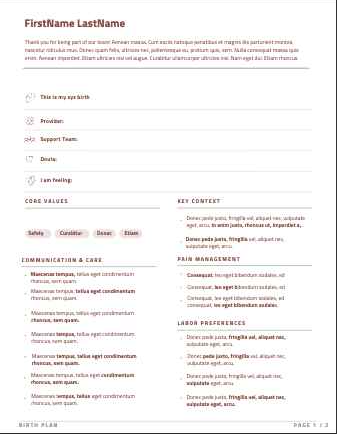
This step turns everything you’ve tagged and written into a customized, designed birth plan — one page, front and back.
Review and edit any of your answers. Then, follow the steps to make selections for your birth plan's design and synthesize your preferences into its contents.
Still tagged "Come Back Later" — these won't appear on the plan
· {{ li.title }}
Now make it look and sound like you.
The bones of the document — how it's laid out and what the type feels like.
How the plan is written. It should sound like you.
How the color shows up on the page.
Pick the hue; the mood you selected above dictates how "loud" it gets.
A photo of you (or your family) on page 1 helps the care team see the people behind the plan.
Now decide what goes in.
The Birth Plan Builder reads everything you've shared, and it shows you how it plans to synthesize everything before writing a word. You clarify anything it got wrong and overrule anything you want done differently. Nothing goes on the page without your say-so.
Nothing is written until you approve — you'll see the proposal first, and clarify or overrule before it writes a word.
Regeneration rewrites the whole plan, so any line edits you've made to the current one will be replaced.
{{ genError }}
{{ workingTitle }}
{{ workingMsg }}
This can take a couple of minutes — keep the app open.
Time to Clarify
{{ pr.kindLabel }}
{{ pr.text }}
Anything else I should know?
Ready Enough
No plan yet!
But that's okay because the true power of a birth plan is not in a piece of paper. It's in the process of creating it. Work through the steps, tag your options, then build.
{{ planStepLine }}
Once you assemble your birth plan, questions specific to you and your preferences will generate here.
Bring the right questions to your next appointment
So much of your plan depends on your provider and your hospital… which monitors they have, what the unit's protocols tie together, what your provider's approach is. This reads your plan and builds the specific questions only they can answer, so you find out now instead of in labor. It explains how hospitals often work; it's not medical advice.
{{ askWorkingMsg }}
This can take a minute — keep the app open.
{{ askError }}
These come from your plan. They're about how I see hospitals work most of the time, and nothing should be considered individualized medical advice. The goal is to ask better questions and get better answers!
After the appointment — how did it go? Your read of the conversation is data too.
{{ editHint }}
Your Birth Plan
This is your plan. Read it slowly.
{{ provenanceLine }}
Loading your plan preview…
PDF keeps the full design exactly as you see it here. Word loses some of the formatting, but lets you edit and customize it yourself in docx format.
Want to change something?
Your PDF downloads exactly as it looks here.
{{ fbNote }}
{{ planStepLine }}
Made by Jillian Carpenter
for more birth education, support & advocacy
© 2026 Jillian Carpenter & Co. All rights reserved.
Licensed to {{ licEmail }}